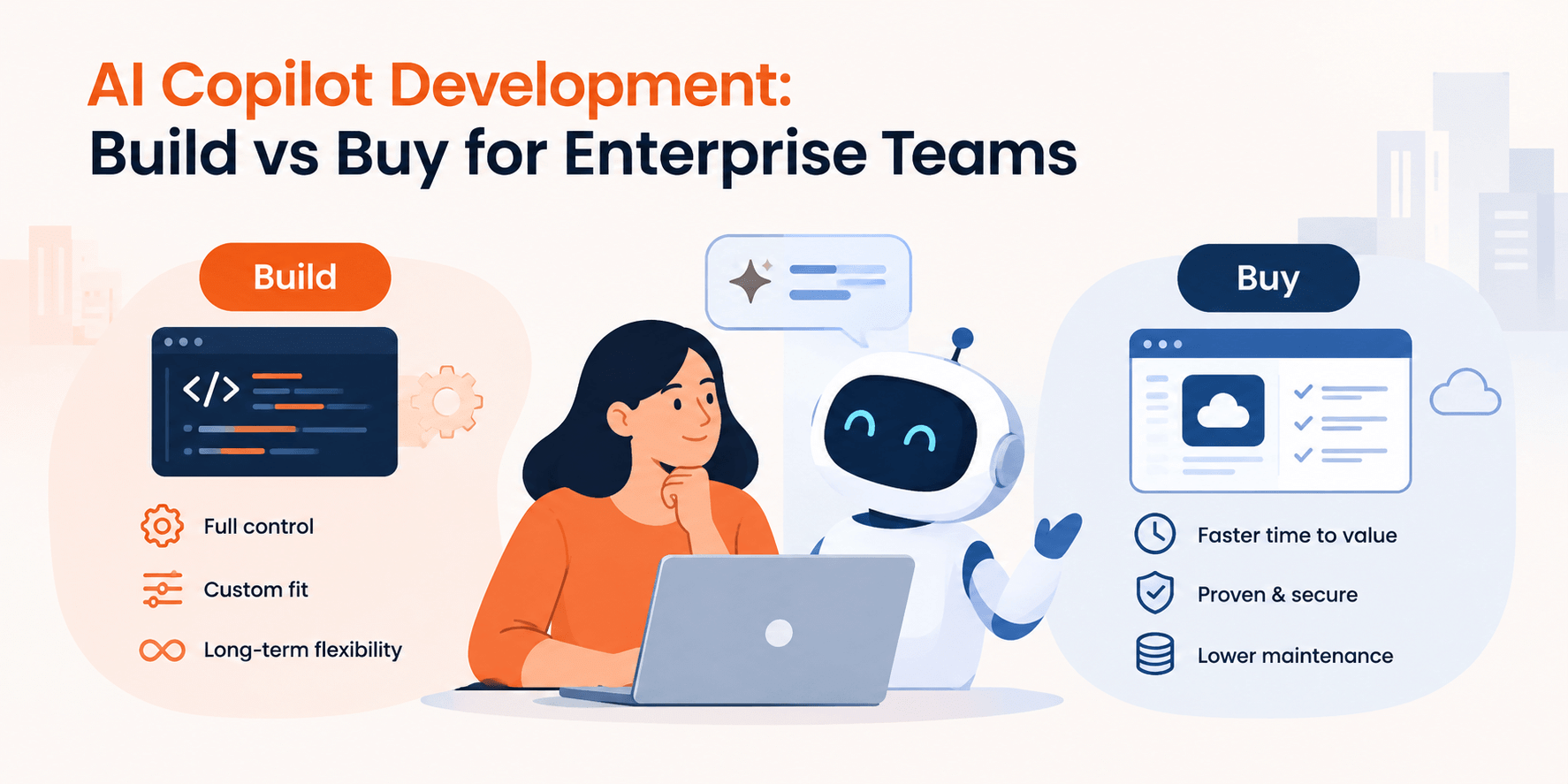
AI Copilot Development: Build vs Buy for Enterprise Teams
Niraj SalotSeptember 25, 2026
Share this article


Let AI highlight what matters.
AI copilot development allows employees to complete daily tasks with the tools they are already familiar with. The decision of choosing either a ready-to-go or custom-built copilot will depend on several factors such as company workflow, data requirements, the level of control, and budget.
That sounds straightforward until a team compares a ready-made assistant with a custom product feature. One may live in days but stop at generic drafting and search. The other can understand account history, apply role permissions, and prepare the next action inside a product. Good AI copilot development starts with that practical gap, not with a preferred model or a long feature list.
A co-pilot assists a person in completing a job. It is capable of collecting information, defining something, creating a reply letter, comparing possibilities, and advising the person on the subsequent steps. However, the responsibility for checking the result and deciding what to do next lies with the person. Therefore, when speaking about AI co-pilot development in enterprise software, one must view the entire experience that the product has to offer in terms of the place where the assistant appears, types of input information, data contributed, and possibilities of its adjustment by a user.
This is different from adding a chat window to a website. A useful enterprise copilot is embedded in a real workflow. In a support console, it may read the current case, approved knowledge articles, and the customer’s entitlement before drafting a reply. In a procurement tool, it may compare a new contract with an approved clause library. The interface is only the visible layer; identity, retrieval, integrations, evaluation, and auditability do most of the hard work.
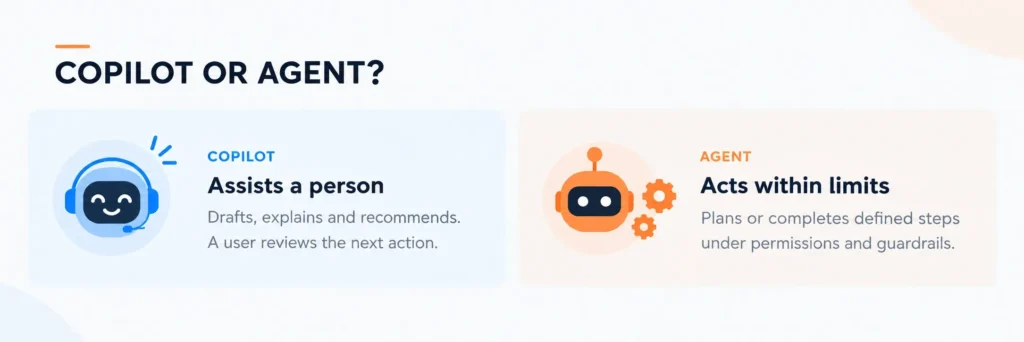
The simplest AI Agent vs AI Copilot distinction is who controls the next action. A copilot recommends and prepares; a user approves. An agent is designed to pursue a goal and take one or more actions within defined limits. For example, a copilot can draft an account-renewal email for a manager. An agent may identify at-risk accounts, schedule follow-ups, and update records according to policy.
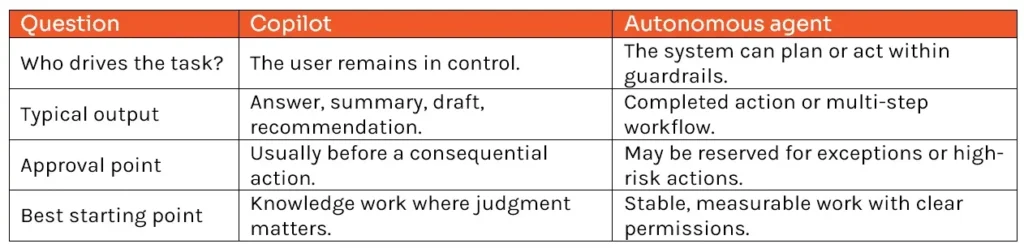
Agentic AI describes systems that can reason about a goal, use tools, and adapt their next step. That does not make autonomy the right default. Many regulated or customer-facing processes benefit from an assistive design because review is part of the control.
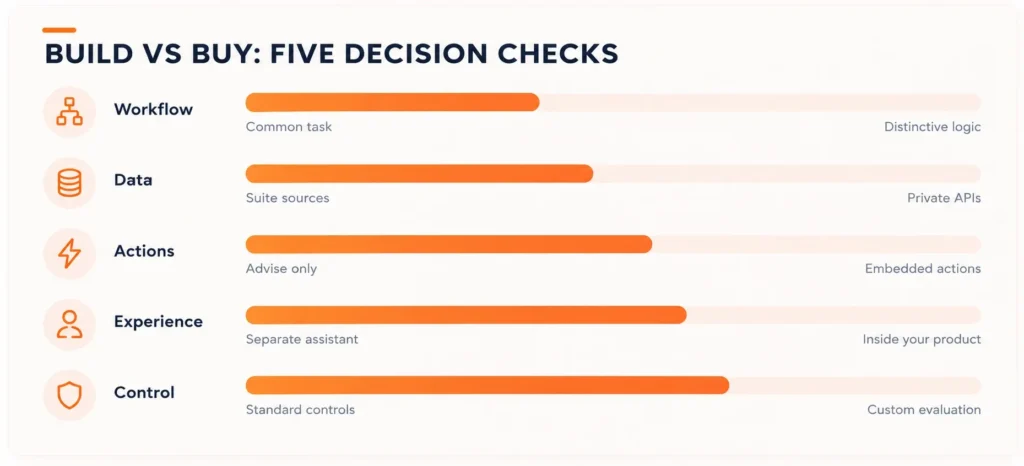
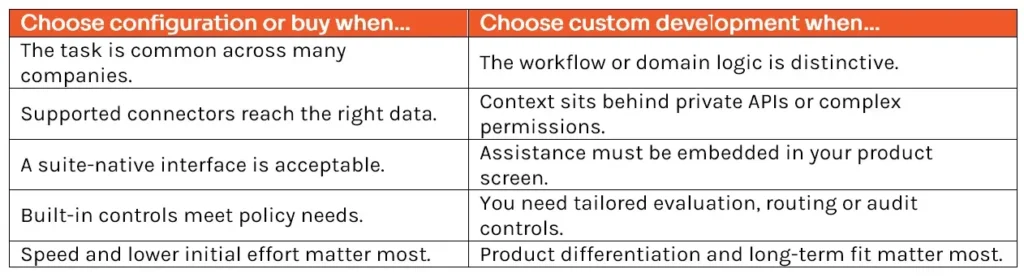
The fastest decision is not “Which vendor has the best demo?” It is “How distinctive is this workflow?” Use five checks before funding AI copilot development.
Buying or configuring an existing platform is sensible when most work happens in its ecosystem. Microsoft documents connectors and knowledge sources for grounding agents in Microsoft and non-Microsoft data. Google similarly supports connectors and custom agents for enterprise search and work. If the aim is to shrink paperwork, locate regulations, create routine communications, or automate a regular process, the skillset may suffice without too much engineering.
Choose this approach when the process is repetitive, the installed software supports the systems of record, the built-in authorizations give you what you need, and the system can be set up to work via Teams, Outlook, Microsoft 365, or an equivalent program. Carry out a small pilot project. If you get satisfactory results and user satisfaction with the implementation, there is not much sense in investing in a custom-built AI riding instructor.
Read Also: Agentic AI vs AI Agents: The Architecture Difference Enterprises Keep Getting Wrong
Custom AI copilot development becomes appropriate when the workflow itself is part of the company’s competitive advantage. It is also justified when context is spread across product databases, private APIs, and domain-specific documents; when each role needs a different view; or when the copilot must work inside a customer-facing product rather than a general productivity suite.
A custom build is not automatically “better.” It creates ownership. Your team must maintain integrations, monitor answer quality, manage model changes, and keep the knowledge layer current. The business case should show why better fit, safer behavior, stronger product differentiation, or lower unit cost at scale outweighs that ongoing responsibility.
A serious engagement begins before model selection. An AI Copilot Development Company should map the work, define measurable outcomes, and identify decisions that must stay with people. From there, AI Copilot Development Services usually cover the following layers.
This is why AI copilot development is a product program rather than a one-time API integration. The model will change. Internal content will change. User expectations will change. The architecture needs room for all three.
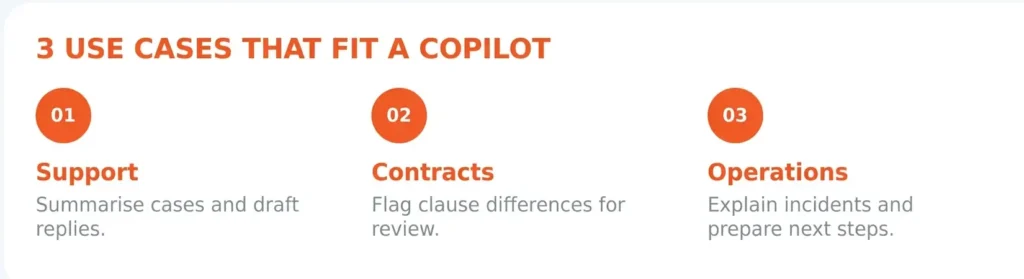
1. Support Resolution Inside the Agent Console
A support enterprise copilot can summarize the case, retrieve approved articles, surface account-specific constraints, and draft a response. The agent reviews the draft and sends it. Measure average handling time, first-contact resolution, escalation rate, and the share of drafts accepted with light edits. AI copilot development adds value here because the context is already structured and human review remains natural.
2. Contract Review Inside a Procurement Workflow
The copilot can compare proposed language with an approved playbook, point to the relevant policy, and prepare suggested edits. It should not silently approve a contract. Measure review cycle time, missed deviations, and how often legal specialists must revisit standard clauses. Custom AI copilot development matters when clause libraries, risk thresholds, and approval routes are company-specific.
3. Operations Investigation Inside an Internal Product
An operations copilot can gather recent events, explain a likely cause, and prepare a remediation checklist. It may open a draft incident record, but a responsible owner approves any production change. Useful measures include time to diagnosis, repeated incidents, and the accuracy of cited evidence.
Keep the first AI copilot development release narrow. Pick one role, one recurring job, and a bounded set of trusted sources. Establish a baseline before launch, then compare completion time, error rate, adoption, and escalation. Include adversarial and permission tests, not only happy-path demonstrations.
Expand only after users can see why an answer was produced and the team can trace failures. A small, observable copilot that earns trust is more valuable than a broad assistant that produces impressive but unreliable responses.
The right path may be a configured platform, a custom product capability, or a staged combination of both. The deciding factor is not novelty; it is whether the solution can use the right context, fit the real workflow, and operate within clear controls.
NextGenSoft’s AI Copilot Development Services cover workflow discovery, context architecture, product integration, evaluation, and production rollout. If your team has a high-value workflow in mind, start with a focused discovery conversation and leave with a build-versus-buy recommendation—not a predetermined answer.
1. How long does AI copilot development take?
Answer: It depends on integration depth, data readiness, review requirements, and the number of workflows. A focused pilot can be planned quickly, but production readiness requires evaluation, security, and operational ownership. Scope the first release around a measurable task instead of a date-driven feature list.
2. Can an enterprise copilot use our existing permissions?
Answer: It should. Identity and authorization need to be applied when retrieving data and again before any action. A polished answer is not acceptable if it exposes information the user could not otherwise access.
3. Do we need to choose one model permanently?
Answer: Usually not. A modular design can separate the product workflow, retrieval layer, and model provider. That makes later changes possible, although every model change still needs evaluation.
4. How should we measure success?
Answer: Measure the job: time saved, error reduction, cycle time, adoption, and user corrections. Also track groundedness, latency, cost per completed task, and permission incidents. Usage alone does not prove value.
 Niraj Salot
Niraj Salot, with 20+ years of expertise in software architecture, specializes in delivering robust enterprise applications. His cloud optimization skills help clients cut costs while maximizing performance. As a key leader at NextGenSoft, he drives scalable, efficient, and high-performing solutions.
We’re ISO/IEC 27001:2022 certified, ensuring your projects are executed with globally recognized security standards.

INDIA
 sales@nextgensoft.io
 +91 81284 66678

 Brijesh Shah
CEO, NextGenSoft
Brijesh Shah
CEO, NextGenSoft


