ERP and CRM Integration: Patterns, Pitfalls and When to Bring in a Partner
Priyanshu JethanandaniOctober 16, 2026
Share this article


Let AI highlight what matters.
ERP integration connects ERP, CRM, and other applications to automate workflows and data exchange.
Four integration patterns: Point-to-point, middleware/iPaaS, API-led, and event-driven integration.
Common challenges: Data mismatches, duplicate records, synchronization failures, and security risks.
Best practices: Define data ownership, test workflows, monitor errors, and ensure reliable recovery.
Implementation approach: Choose in-house development or an integration partner based on expertise, complexity, and maintenance needs.
NextGenSoft services: ERP and CRM integration, API development, middleware, API security, and data integration.
A sales team closes a deal, but finance still needs a spreadsheet to raise the order. The customer changes a billing address, yet the next invoice uses the old one. These are workflow failures that a connection alone will not fix.
Successful ERP integration starts with agreement on data ownership, transaction rules, and recovery. This guide explains four architectural patterns, the pitfalls that disrupt delivery, and how to decide whether your team needs an integration partner.
The integration of an ERP is the process of merging it with other software to help facilitate the transfer of information and streamline business processes. In other words, connecting an ERP with a CRM means linking aspects handled by employees who deal with customers with other aspects handled by the finance department, the inventory team, the purchasing department, and the fulfillment team.
Let us look at an example. The CRM may cause an order to be created in an ERP system as soon as a CRM sale is processed. The outcome of the transaction in the ERP system will include a confirmation of an order number, an invoice, and payment. In simplest terms, the CRM can show an order as confirmed only after getting an OK from the ERP system.
Read Also: MCP vs. RAG vs. API Calls: Choosing the Right AI Data Integration Method
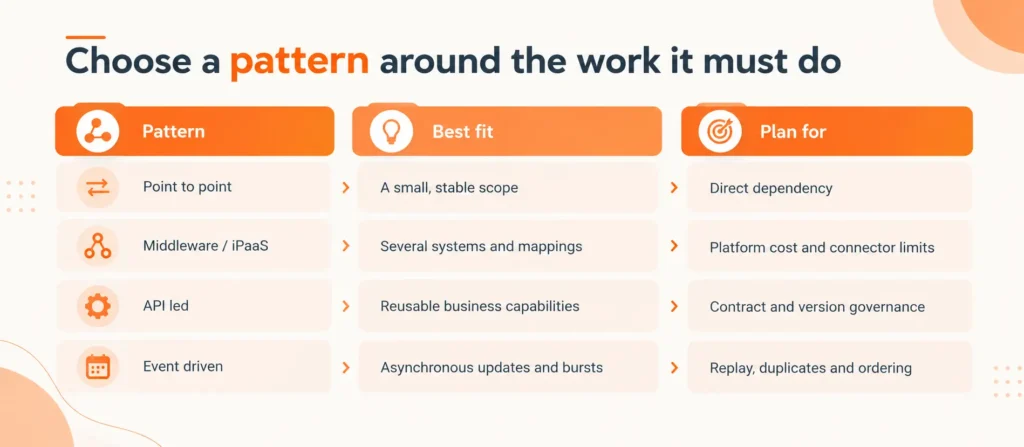
The patterns define the different architectural options available to different systems. In other words, using an iPaaS means that an API can be used as well, although it is not limited to just that.
A direct connector, or a customized solution, connects data from two applications. It is suitable when there are certain workflows, predictable data transaction volume, and a person in charge of maintenance. This could lead to difficulties when each application needs to be connected to a number of different applications.
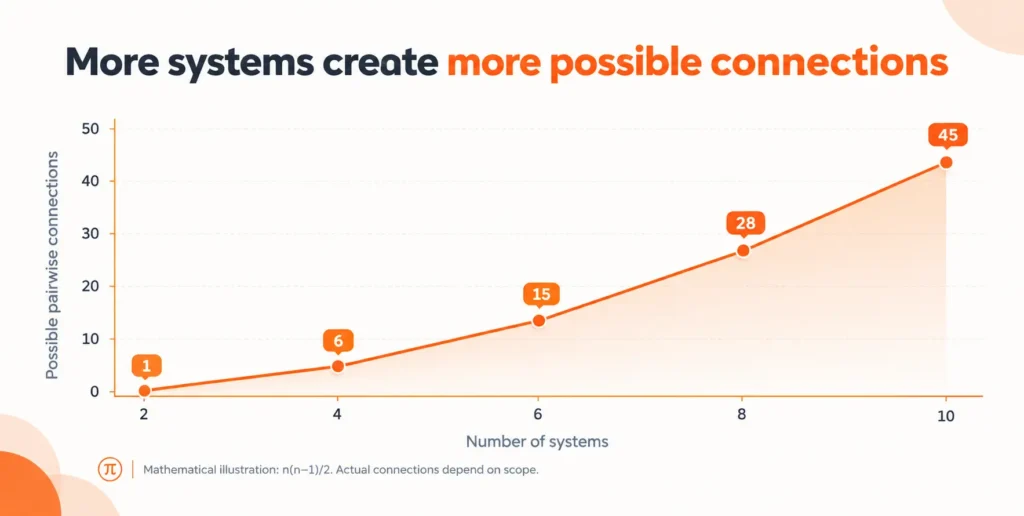
For 10 applications, a fully connected pairwise network has as many as 45 possible connections, so the formula n(n-1)/2 is used here. This is just an example, and it does not measure the scope of the project, but it is reasonable to start tracking dependencies before adding extra connections.
Middleware is an intermediary in transfers between applications that deals with the routing, transformation, and orchestration of data. iPaaS, or integration platform as a service, has similar features, but it operates through a specific platform.
This solution is ideal when dealing with multiple applications, repeated connections, and dedicated teams that need to oversee operations. Be sure to assess the effectiveness of the provider against your specific needs, resources, and requirements for recovery.
API-led architecture exposes governed capabilities such as customer lookup, product availability, or order submission. Several applications can reuse them instead of repeating ERP-specific logic. It fits businesses connecting portals, commerce platforms, and multiple sales channels.
When comparing API integration systems, ask for versioned contracts, authentication rules, contract tests, and ownership of breaking changes. Simply calling an API does not make an architecture API-led; reuse and governance are the distinguishing features.
An application publishes an event such as OrderAccepted, and subscribed consumers act on it. This fits workflows that can tolerate eventual consistency, traffic bursts, and multiple downstream consumers.
Design for duplicate delivery, out-of-order updates, and replay after downtime. Use idempotent processing, where repeating a message does not repeat its business effect. Keep failed messages in a reviewable queue and monitor processing lag. A live stock check may still need a synchronous API call before a sales commitment.
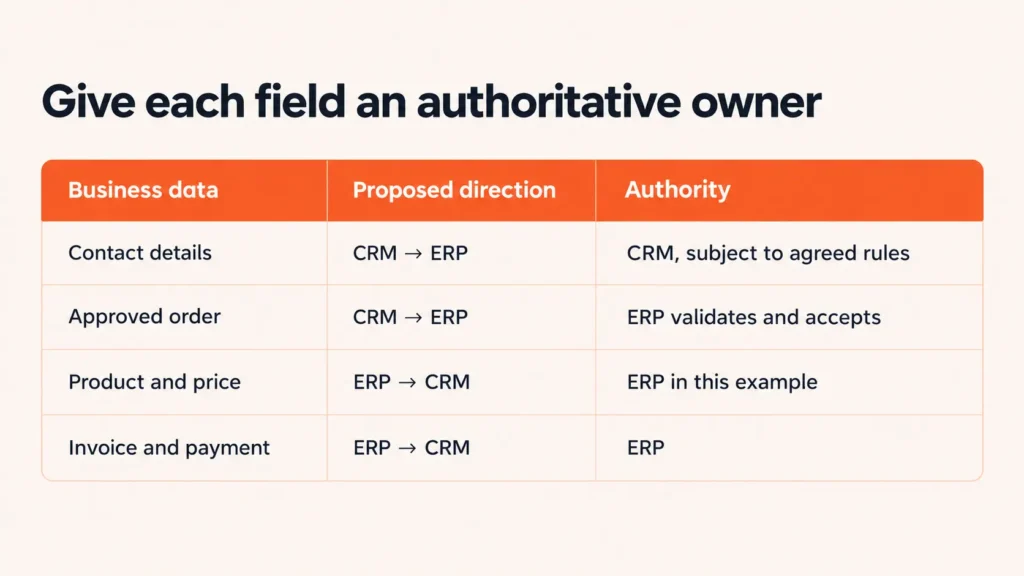
Delegate responsibility at the local level. In this scenario, sales are responsible for contact details while finance is in charge of credit limits and billing addresses. Determine the people who would initiate a change, approve it, and which system would carry out the final action. “Both systems assume the responsibilities of the customer” style leaves many questions unanswered.
A single customer can be represented by multiple accounts or subsidiaries. Names and email addresses by themselves are weak identifiers. Use stable IDs in addition to a clear mapping of the records to prevent inconsistencies. Eliminate duplicate records before the data is uploaded for the first time and create rules regarding the merging process, dormant accounts, currencies, and units.
Say what the new information should do for every specific field rather than turn on two-way synchronization for the entire object. Make a note of the information source and its history in time, and avoid infinite updating.
If order creation times out after the ERP commits it, retrying blindly can create a duplicate. Use an idempotency key or an external order reference with duplicate checks. Retry transient failures with bounded backoff; quarantine validation errors for correction. Carry a correlation ID through logs, so support can trace the whole transaction.
You must test for expired credentials, partial line-item failures, terminations, and closed endpoints. Use least-privilege access, secure confidential data, and redact sensitive logs. Separate human logins from machine access.
Read Also: MCP Server: To Adopt or Not? Enterprise Decision Framework
The same design issues arise when it comes to Salesforce, HubSpot, and Dynamics. Focus more on the mechanism surrounding a transaction, the data volume, and supported platform capabilities than the brand.
When evaluating Salesforce integration services, a mapping review, stress-testing, and recovery demonstration must be mandated according to ERP workflows. Similar criteria for acceptance should be utilized for all CRM vendors.
The decision should be to conduct the implementation in-house when work has a limited scope, engineers possess enough knowledge about both systems, and the team is up for providing support after the integration is completed. Outsourcing to a partner may be necessary if a crucial experience gap exists in platform knowledge, recovery of operations, safety, or the provision of services.
Apply the following guideline: implement internal processes only when your team is able to guarantee accurate mapping, secure reattempts, production supervision, and an appointed owner of support services. Alternatively, collaborate with a partner until the implementation becomes operational. Retain business data ownership within your own organization if subcontracting implementation.
Evaluate the ERP integration solution in terms of the total operating expenditure: discovery, licenses, environments, testing, monitoring, upgrades, and maintenance. Have partners provide mappings, architecture choices, source access, where possible, details of implementation, and recovery scenarios. Avoid the case where the handoff occurs in such a way that only the original developer can troubleshoot problems.
Start with a limited journey, for example, moving from an approved transaction to the order plenishment stage. Clean and upload the historical data separately from changes currently taking place and define how cut-off will catch alterations during uploads. Conduct tests in a sandbox and run a controlled group pilot before agreeing rollback and manual handling procedures.
Monitor business accuracy during the transportation success:
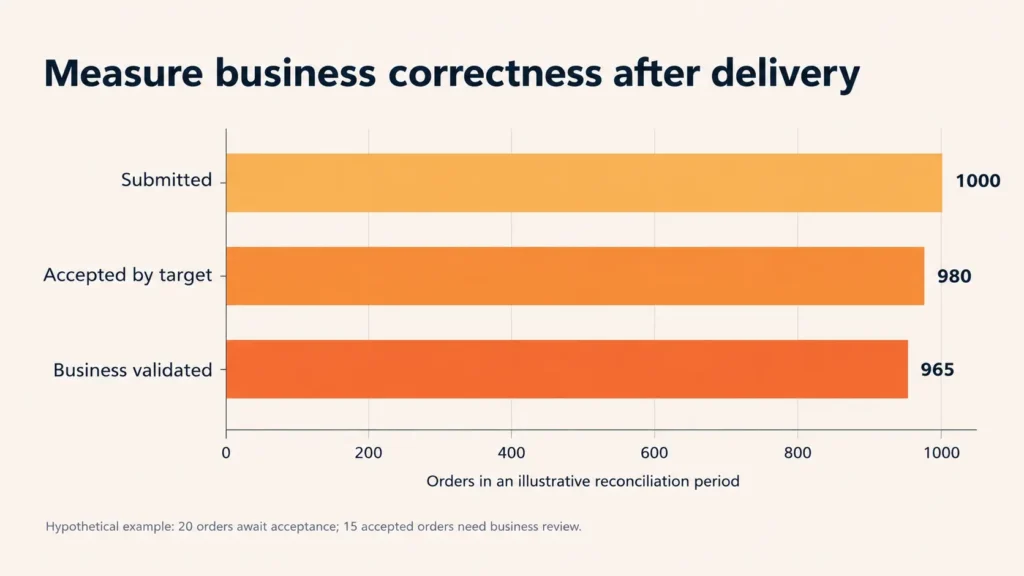
The effective integration of ERP systems is based on specific roles, proper mode of usage, and the recovery process that your group can execute. In particular, you have to implement the first operation, ensure the accuracy of data, and then widen its application.
NextGenSoft can assist you with ERP and CRM integration, API development and design, gateways, API security, middleware, message queues, and data integration. These abilities are significant in cases when the workflow involves client-oriented and operational systems.
So, connect with NextGenSoft now and provide information regarding the ERP and CRM systems in use, priority flows, expected data volumes, and failure points of the current system. Based on this conversation, we will ensure the right solution is provided. Consult now
1. What data should ERP and CRM systems share?
Answer: The information that needs to be gathered for the workflow chosen includes the customer ID, order approval, product details, pricing, and invoice information, along with payment status. Only collect the details that are relevant to each team while laying out the permission and access guidelines.
2. Does ERP integration need real-time synchronization?
Answer: No. For decisions needing timely information like stock availability, immediate look-ups are used. Scheduled batches may be used for historical reporting.
3. Is an iPaaS better than a custom connector?
Answer: An iPaaS can simplify the common mapping and monitoring processes. However, custom connectors can give you better control in terms of hybrid logic. Make a comparison between the offered workflows, price, security criteria, and the ability of the team to administer both options.
4. How long does connecting an ERP and CRM take?
Answer: There is no set time frame for this task. The data quality, types of custom objects, approvals, API access, and the testing environment will determine the volume of work needed to be done.
5. Will single sign-on synchronize customer and order data?
Answer: No. Single sign-on manages user authentication across applications. Customer and order synchronization needs separate APIs, connectors, or messaging, along with machine permissions and transaction rules.
 Priyanshu Jethanandani
Priyanshu Jethanandani is a Software Engineer at NextGenSoft, specializing in designing and developing scalable, high-performance software solutions. He is passionate about modern application development, cloud technologies, and AI-driven innovation, with a focus on building reliable and efficient digital products that solve real-world business challenges.
We’re ISO/IEC 27001:2022 certified, ensuring your projects are executed with globally recognized security standards.

INDIA
 sales@nextgensoft.io
 +91 81284 66678


