Vibe Coding to Production: What Breaks and How to Fix It
Pranav LakhaniOctober 28, 2026
Share this article


Let AI highlight what matters.
You thought of an idea for an application. After a series of inputs, modifications, and trials later, you had your feasible application ready. What could take weeks to make in the past can now be created in mere days.
The emergence of software such as Lovable, Bolt, Replit, Cursor, and v0 has greatly shifted the way startups prepare their business ideas. You no longer need a large group of developers to create an MVP and test it.
In fact, the results of GitHub’s 2025 Octoverse report show over 4.3 million repositories connected to AI usage.
Nonetheless, there is an important distinction between the process of app creation and implementation of a sustainable business model.
Launching an app successfully doesn’t mean it is production-ready.
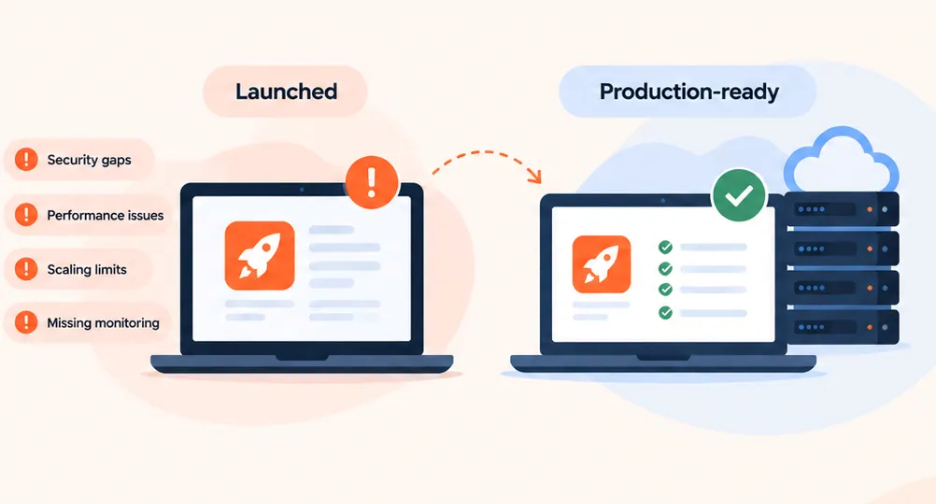
While founders shift from coding in the comfort zone to the real production process, it’s essential to consider things beyond what users see. For those real users, the crucial points include confidentiality, business logic, reliability of the database, performance, and code maintenance.
Fortunately, there is no need to redevelop the whole product. A lot of issues can be identified right away, and you can do it independently in about ten minutes.
AI builders can be especially handy when you want to launch a product based on an idea. It’s possible for them to develop systems, collect data, create a system for signing in and implement features according to an instruction written in natural language.
However, there are difficulties if the application faces a situation not mentioned in the instructions.
These cases are called edge cases which imply situations that should be managed by the application even if they are out of the scope of processes.
Three development patterns contribute to those issues:
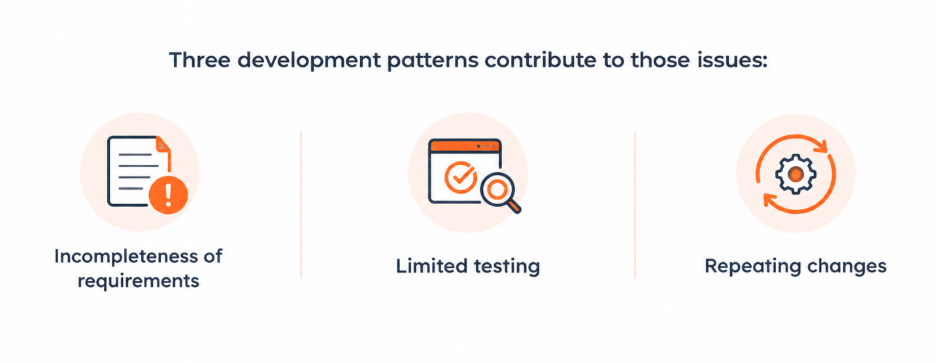
None of these problems means AI-generated code is automatically unsuitable for production.
Before you start bringing in customers, connecting money and demonstrating your product to potential investors, you have to take care of five issues.
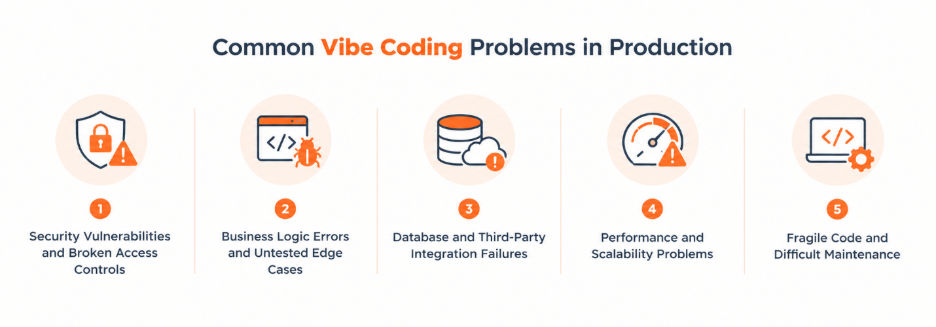
Let’s picture your customer dashboard, where a user can log into their account, send documents and manage other aspects.
Everything seems to be well protected with a login process.
But does the system require all of the users to have access to the document they need?
Many applications face significant security issues here.
Some of the most common security bugs in programming include unguarded API keys, weak authorization practices, unrestricted access to databases and no input validation.
An API key is an identifier that is used by a piece of software to communicate with another one. Some keys can be public, while secret keys must not be revealed.
Authorization specifies what information is allowed for modification once a user logs in. Input validation is the check confirming that the information given fits certain criteria of the application.
The OWASP API Security Top 10 highlights broken object-level authorization as its number one API-related risk item in the 2023 version. When an application doesn’t ensure that a user is really permitted to access a certain record, that opens up for abuse.
For founders, it can lead to leaking clients’ details, making unauthorized changes to accounts, or even incurring costly situations prior to attaining customer trust.
The following four recommendations will help you achieve that:
It is possible for a feature to function perfectly on the interface, yet generate inaccurate results in business.
If the application does not manage simultaneous booking correctly, both may get confirmations.
The interface may be perfect, while the business logic fails.
Business logic includes a set of regulations that define how the application should work.
Issues arise if these regulations are either incomplete or wrongly programmed. For instance:
These errors cause influence with respect to the outcome of which users are charged.
Let’s say your application serves 500 orders and you estimate the error as ₹20 per each instance. This comes up to ₹10,000 of possible refund errors.
This is just an example calculation and it is not supposed to show the actual industry error. Nevertheless, it shows that errors become serious problems with real business transactions.
Start from listing the essential requirements for your best features, their acceptance criteria. These are simple rules defining what is an acceptable feature.
Then run tests for four categories of cases:
Automated tests can perform these checks every time the application is modified.
Many applications today involve several services functioning in harmony.
For example, you may rely on Supabase for data storage, Stripe for payment processing, an email service provider for notifications, and some AI API for data.
Each connection to a third-party API creates the risk of a failure.
More specifically, problems may arise when the external API goes down or takes longer to respond.
In the absence of some rules, you may have to deal with incomplete orders, missing transactions, duplicate payments, or inconsistent data from various ecosystems.
Database modifications can lead to issues as well. For instance, an update by an AI may execute some changes in a table required by legacy functionality.
Why does it matter?
Picture 100 customers making a paid transaction and five accounts failing to update due to a break in the link between the payment service and the database. You now have five customer support cases on your hand and possibly five disputes arising from the transactions.
There are four ways through which we can enhance the reliability of the processes involved:
It is also advised to conduct version-controlled database migration.
While using your application alone, it may seem very quick.
However, things change when 50 people are using the application at the same time.
What will happen to the performance when the database increases from 100 to 100 000 records?
This is where performance and scalability become critical concepts.
Performance refers to the speed at which the application operates. Scalability refers to how well an application functions when the number of users, requests, and data increase.
The problems that might occur include inefficient database queries, a huge number of API requests, a lack of server resources, and caching problems.
The database query is a request to read or change the stored data, while caching is the temporary storage of data required in the process.
Signs you may have this problem:
Let us assume that your application has the capacity to handle 1,000 requests per hour under normal circumstances. However, following a marketing drive, the request levels have surged to 5,000 requests per hour which is five times normal traffic levels.
In cases where the database or server is incapable of handling this increase, clients could suffer from issues in experience delays or failed requests right when your product is on spotlight.
Start measuring your application performance rather than just assuming the probable cause of the problems you might be facing.
Do an analysis of the performance of the major application components such as database query time, server utilization, external api latency, and application main actions.
Then:
Load testing simulates multiple users or requests to measure how an application performs under pressure.
One of the greatest apprehensions of founders regarding applications made by AI is that they won’t know what to do when they want something to be revised.
For instance, imagine you tell the developer to make changes to the system of subscription. The system is updated fine, but the account settings page does not show the right plan anymore.
To solve this problem, you use another prompt, and now you realize that the billing history does not work either.
This phenomenon often shows that parts of the application are too dependent on each other.
The code that was created may contain redundant business rules, unnecessary dependencies, inconsistent implementations, and highly connected components.
The concept of dependencies here means a package or a component that the application uses. It creates technical debt which leads to difficulties in further changes made later.
This problem is typical not only for AI-generated apps but for things built in a traditional fashion.
Think about a founder expected to introduce five new features just before going to a presentation for investors.
If every new feature requires two rounds of fixing the older ones, it means that more time is spent on repairs than on the development of the new features.
The immediate consequence of this is that the process of development becomes slower. However, over a longer period of time, maintenance turns out to be less predictable and harder to estimate.
The first step towards solving this problem is to define all the vital components at once: authentication, billing, customer data, important business processes, and so on.
Make an audit of those components mentioned above, review and simplify the most complex parts first.
Now transfer any non-unique rules to a common library, get rid of unnecessary libraries, document all important decisions, and create automated regression testing procedures.
For applications with growing maintenance problems, NextGenSoft’s AI-built app for production engineering support provides a relevant starting point for architecture assessment and modernization.
Use this production readiness checklist to identify what has been checked and what still needs attention.
| Production check | What you need to confirm |
| Architecture audit | Key components, dependencies, and data flows are documented. |
| Authentication and security | Users cannot access other accounts’ data, and secrets are protected. |
| Critical workflow testing | Payments, bookings, logins, and other important actions have passing tests. |
| Database reliability | Changes are reproducible, and failed operations are handled safely. |
| Deployment and recovery | Staging is separate, releases can be rolled back, and backup restoration has been tested. |
| Performance testing | The app has been tested against realistic user and traffic expectations. |
| Monitoring and costs | Errors, downtime, response times, and third-party API costs are visible. |
A good approach to perform the checks would be completing the following five stages.
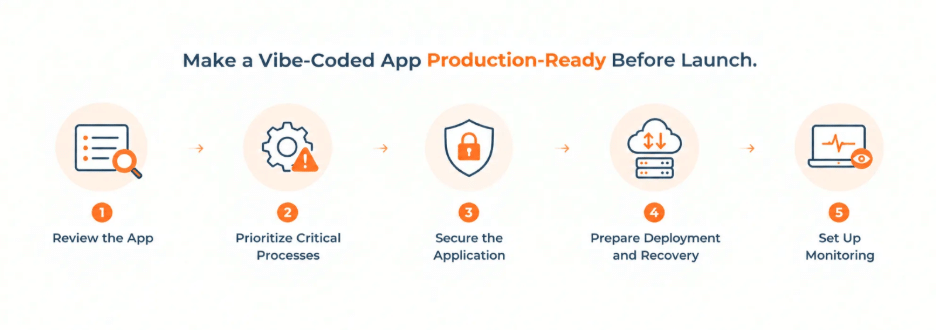
Stage 1: Review current application. Identify application features, connection to the database and other services and environment variables. Make notes of the people responsible for development of the application.
Stage 2: Check core processes as the ones causing greatest disruption in case of failure. Employ unit tests for particular functions, integration testing for components and end-to-end testing for the complete scenarios.
Stage 3: Secure the application. Check the access rights as well as the key information, input validation and third party dependencies. Solve any problems with the unauthorized access and leaks of sensitive data before new consumers join.
Stage 4: Set the processes for deployment and restoring. Maintain a test environment where experiments can be conducted without damaging the customers. Automate the cycles of resets, create documentation for restore and apply backup in the test environment to check if the recovery was successful.
Step 5: Set up monitoring. Track application errors, uptime, response times, and relevant operating expenses. For AI-powered features, monitor token usage and the cost of individual requests so higher adoption doesn’t create unexpected bills.
No. A complete rebuild is not always necessary. An application created with AI can be suitable for production when its security controls, business rules, reliability, and maintainability meet the requirements of its users.
The better decision is usually based on what the existing code can support.
You can often keep the existing application when the main architecture is sound and the problems are limited to specific features.
Sometimes the user interface works well, but the underlying backend needs improvement.
You might preserve the existing screens while redesigning payment handling, database access, or the connection between different services.
A partial rebuild allows founders to retain working features while replacing components that create recurring problems.
A larger rebuild becomes worth considering when fundamental design decisions make the application difficult to secure, test, or operate.
Consider these three questions before deciding:
The rule that needs to be followed in this case is very straightforward: make an audit first, and fix what is redeemable and only start over completely if design prevents normal operation.
Here lies the true purpose: it is not to replicate the achieved results but rather to protect them so that the product can be developed further.
1. Can Vibe-Coded Applications Be Used in Production?
Answer: Yes, it can be used but only if the application possesses the necessary security precautions, stable business logic, monitoring, testing, and recovery training.
2. How Do You Test AI-Generated Code Before Deployment?
Answer: You should first understand what actions need to be performed by the users, i.e., their most important activities. Test the app for its regular/perfect operation, incorrect input, simultaneous requests, and system failures.
3. How Long Does It Take to Make a Vibe-Coded Application Production-Ready?
Answer: It depends on how complicated the application is and the quality of that code as well as how many problems were found. For a simple app with only some minor bugs it may take several days for it to become ready from the production perspective.
4. Make Your App Ready for What Comes Next
Answer: Building an application with AI is already a meaningful achievement. NextGenSoft’s free Lite Audit is designed to help you understand where your application stands. Get a review of security, scalability, operating costs, backups, and monitoring, with a written report outlining the next steps.
 Pranav Lakhani
Pranav brings over 20 years of expertise in software development and design, specializing in delivering enterprise-scale products. His unique ability to manage the entire product lifecycle ensures innovation and technical excellence across every project.
We’re ISO/IEC 27001:2022 certified, ensuring your projects are executed with globally recognized security standards.

INDIA
 sales@nextgensoft.io
 +91 81284 66678


