Docker vs Kubernetes: Do You Actually Need a Container Orchestrator?
Priya GoyalSeptember 25, 2026
Share this article


Let AI highlight what matters.
No, the use of Kubernetes by many teams cannot be justified just on the basis of the fact that they work with container technology. In the Docker vs. Kubernetes difference, Docker makes it possible to create a package that contains the application and its required components; Kubernetes serves to control the use of containers on many machines.
Docker Compose allows the provision of services and networks in a single file, which could be sufficient for a smaller application. Kubernetes becomes relevant only when the task of the team is to automate such processes as shifting workloads, scaling, and finding services by different components through the use of clusters.
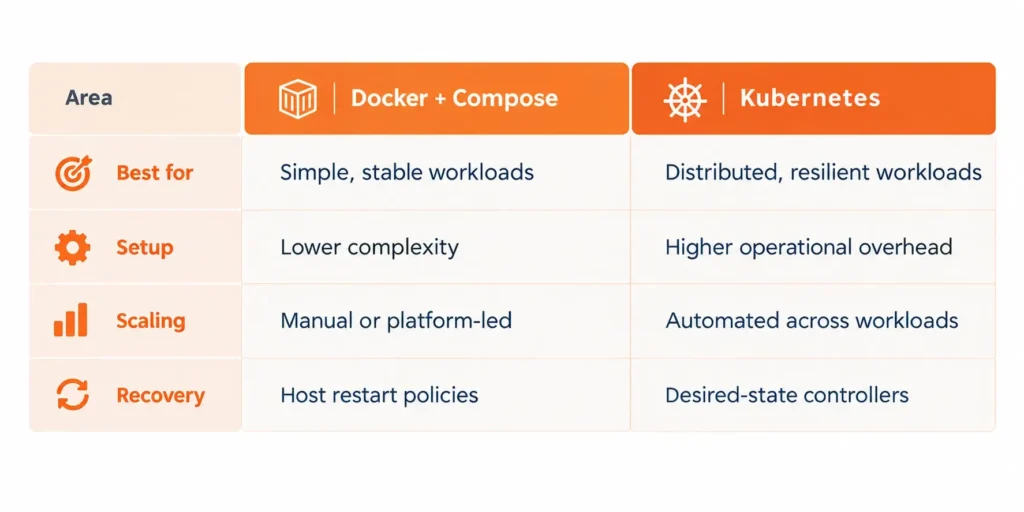
Docker and Kubernetes differ in terms of scope.
Docker constructs images and uses them as containers, showing that the application and its components can work thanks to the Docker environment independently.
Kubernetes is in charge of the runtime level. It runs on a node-based container runtime and oversees some higher-level objects such as Pods, Deployments, Services, ConfigMaps, and Secrets.
This is why “Kubernetes vs Docker” can be a misleading framing. Most teams do not replace containers with an orchestrator. They keep container images and add orchestration only when coordinating those images across infrastructure becomes difficult.
Read Also: CI/CD with Kubernetes: A Harry Potter-Inspired Guide
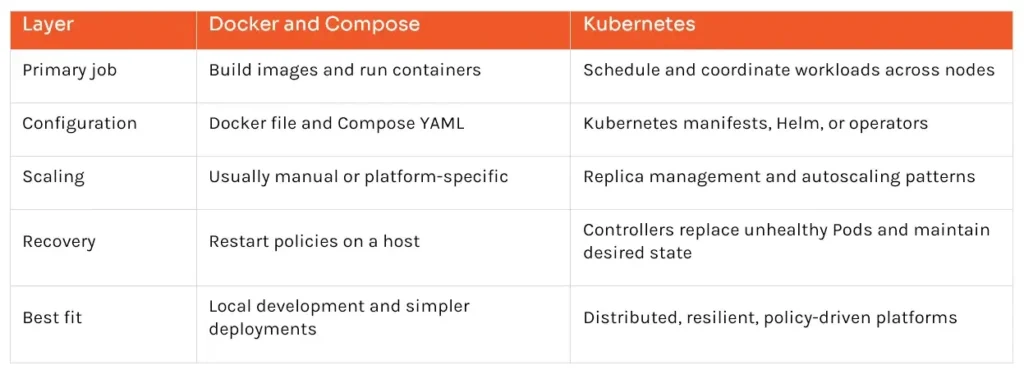
A useful Docker vs Kubernetes comparison asks two separate questions. First, how should the application be packaged? Second, how much help does the team need to run it reliably? Containers answer the first question. The second tells you whether Compose, a managed container service, or Kubernetes is the better fit.
Docker Compose specifies services, networks, and volumes in a single YAML file and starts the application stack with a single command. The usage of the software has been described by the developer in the development, testing, continuous integration, staging, and production phases. However, the latter should be provided with a reliable backup, security, monitoring, and recovery system.
Choose Compose or another simple container deployment model when most of the following are true:
At this stage of a Docker vs. Kubernetes decision, the simpler setup is often the safer one. There are fewer moving parts to patch, monitor, secure, and troubleshoot, so the team can spend more time improving the product.
Kubernetes earns its place when the operational problem is distributed by nature. That usually means workloads span several nodes, services must stay available through node failure, releases need controlled rollouts and rollbacks, or teams need consistent scheduling, access, networking, and resource policies.
The Docker vs Kubernetes choice starts leaning toward Kubernetes when several of the following conditions appear together:
Kubernetes Deployments provide declarative updates for Pods and ReplicaSets. Controllers then reconcile actual state with the desired state. That automation is valuable, but it does not remove operational responsibility; it changes what the team operates.
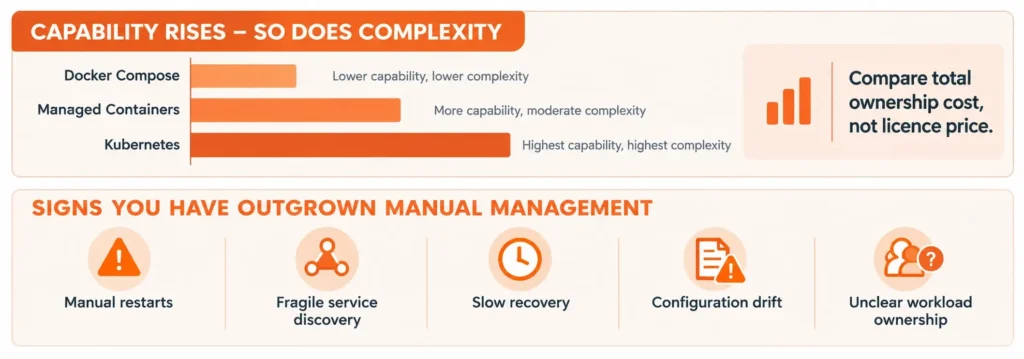
The strongest migration signal is recurring operational pain, not container count. If engineers repeatedly restart workloads, edit host-specific scripts, track ports in spreadsheets, or discover failures only after users report them, coordination has become a platform problem.
Look for problems the team already feels. Deployments may depend on a carefully ordered runbook. A failed host may take too long to recover. Engineers may balance replicas by hand, chase configuration drift, or log in to several machines just to learn what is running. A Docker vs Kubernetes assessment should connect each recurring problem to a specific capability and check whether Kubernetes solves enough of them to earn its added complexity.
Read Also: The Ultimate Guide to Top DevOps Tools : Streamline Your Software Delivery Pipeline
Kubernetes is open source, but a production platform is not free. Even with a managed control plane, teams still own workload design, identity and access, network policy, ingress or gateway configuration, observability, image security, secrets, upgrades, backup strategy, capacity, and incident response. A production-quality cluster requires planning for resilience, according to the Kubernetes documentation.
The cloud bill tells only part of the story. Engineering time can cost more than the cluster itself: someone must design the platform, train the team, cover incidents, manage upgrades, check add-on compatibility, and debug problems across several layers. Poor resource settings can also waste capacity or make workloads unstable. A realistic Docker vs Kubernetes business case should compare total ownership cost, not just license price.
A managed service reduces control-plane work but does not eliminate cluster operations. Serverless containers or a managed application platform may deliver autoscaling and resilient deployments with a smaller learning curve. Kubernetes is justified when its portability, extensibility, policies, and scheduling control create more value than that overhead.
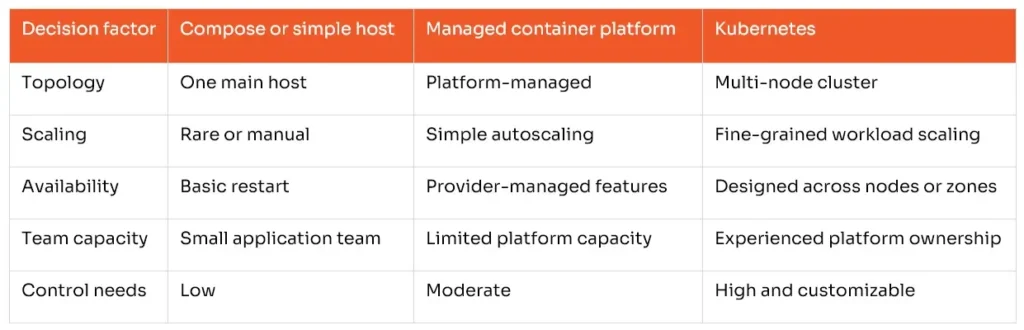
For Docker vs Kubernetes planning, judge the environment you have now, not the one you might have three years from today. If most needs fall in the first two columns, a cluster can probably wait. If they repeatedly fall in the final column and the team can support the platform, Kubernetes becomes a sensible option.
Avoid turning orchestration into a big-bang rewrite. First, standardize images, health checks, environment configuration, secrets handling, logging, and CI/CD. Next, use Compose to make local and test environments repeatable. Then measure deployment time, recovery time, change failure rate, utilization, and scaling events. Those baselines reveal whether orchestration will solve a measured constraint.
If the Docker vs. Kubernetes decision points toward Kubernetes, begin with one non-critical, stateless service on a managed platform. Set up namespaces, access controls, resource policies, monitoring, backup expectations, and clear ownership before moving critical workloads. A small pilot reveals gaps in skills and tooling without putting the whole application at risk.
The best platform is not the one with the longest feature list. It is the one the team can operate reliably at a cost the business understands. NextGenSoft.ai can assess application dependencies, create secure container images, define Compose-based environments, design CI/CD workflows, and plan a Kubernetes architecture only where orchestration has a defensible operational case.
If your Docker vs. Kubernetes choice is stalled between under-engineering and platform overload, explore NextGenSoft.ai’s Containerization Services. The engagement can cover discovery, container strategy, migration, deployment automation, security controls, observability, and ongoing optimization around your workload rather than a predetermined tool.
Docker and Kubernetes are complementary layers. Docker helps teams build and run consistent containerized applications. Kubernetes coordinates those applications across a cluster and automates desired-state operations. For a small, stable workload, Docker Compose or a managed container platform may be the more responsible choice. For distributed systems with proven needs for resilience, scaling, rollout control, and policy, Kubernetes can provide the operating model those systems require.
The right Docker vs Kubernetes answer is simple: use only the complexity you can justify. Start with well-built containers, measure where operations are slowing the team down, and add orchestration when the saved effort and improved reliability outweigh the people, process, and infrastructure needed to run it.
1. Is Docker an alternative to Kubernetes?
Answer: No. In a Docker vs. Kubernetes comparison, Docker builds and executes containers, while Kubernetes coordinates working with containers across all of the involved nodes. Both technologies may be used in one delivery system.
2. Can Docker Compose be used in production?
Answer: Yes, depending on the workload used. Docker Compose can be utilized to build a stack in a production setting. However, the team still has to ensure that security, backup, monitoring, recovery, patching, and availability are considered before proceeding with implementing Docker Compose to produce a working environment.
3. At what scale should a company adopt Kubernetes?
Answer: There is no defined container count as the only indicator of when to employ Kubernetes. The decision to choose between Docker and Kubernetes should depend on the organization’s availability level, deployment frequency, number of nodes used, scaling manner, required policy level, and the abilities of the team responsible for working with the platform.
4. Does Kubernetes reduce infrastructure costs?
Answer: This is not necessarily true. Utilizing Kubernetes can bring forth benefits regarding scheduling and resource allocation; however, overhead of the cluster, idle capacity, observability, flow of information, engineering hours, and assistance can trigger a rise in total costs. Check utilization and effort spent on operations before announcing any savings.
5. Is managed Kubernetes easier than self-managed Kubernetes?
Answer: Yes. But just because the vendor runs a significant part of the control plane does not mean that there is no accountability for configuring workloads, making upgrades, accessing the system, and incident response. The latter is helpful when calculating the costs associated with any activities related to Docker vs. Kubernetes.
6. What should a team do before adopting an orchestrator?
Answer: The team needs to standardize its images, health checks, logging, configuration, secrets, CI/CD, vulnerability scanning, and rollback practices. Plus, it should specify the operational challenge that needs to be addressed.
 Priya Goyal
Priya Goyal, a detail-oriented DevOps Engineer with 2+ years of experience, specializes in building scalable, automated, and reliable infrastructure. Proficient in AWS, Azure, Kubernetes, CI/CD, and IaC, with expertise in GitLab CI, Terraform, Prometheus, and Grafana. Passionate about enhancing performance, security, and automation to streamline software delivery.
We’re ISO/IEC 27001:2022 certified, ensuring your projects are executed with globally recognized security standards.

INDIA
 sales@nextgensoft.io
 +91 81284 66678


